

























Home Filter Club
Filtration essentials delivered on a customizable schedule.
Changing Your Home Filters Made Easy
We know you've got better things to do than remembering to change your home's filters, which is why we created the Home Filter Club. This customizable subscription service makes it easy to stay on top of making sure you regularly change your home's filters. Has the change filter light on your fridge been haunting you for too long? Does your home's air feel stale or stuffy? Keep forgetting to order pool filters? From refrigerator filters to air filters and pool filters, our Home Filter Club allows you to remember which filters you need and have them delivered right when they need to be changed. Do yourself a favor and sign up today!
How It Works
Shop
for the filters you love.
Customize
your shopping cart.
Schedule
your desired delivery frequency.
Enjoy
checking "order filters" off your to do list.
Features

Up to 10% off EVERY ORDER*
Save time AND money with the Home Filter Club! When you subscribe to the filters you need, you can get up to 10% OFF. Every order, every time.
Always FREE Shipping
Love FREE shipping? With Home Filter Club you get FREE shipping on every order. There's no minimum purchase value required.

Modify or Cancel ANY Time
The Home Filter Club is convenient and fully customizable! Add or adjust your order anytime or cancel hassle-free with no hidden fees—perfect for life's changes.
*On Filters Fast® Brand products only. For all other products where Home Filter Club is enabled, receive a 5% discount.
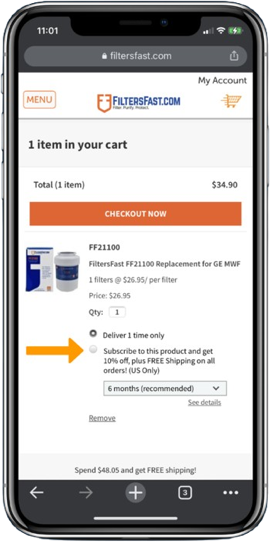
Subscribe at Checkout
Enjoy the convenience of not having to re-order.
Frequently Asked Questions
If you have received an order that you did not place recently, it is likely a Home Filter Club order.
On a previous order, you selected the option to join the Home Filter Club. A confirmation email was sent showing your enrollment in the Home Filter Club subscription. We sent a reminder email 10 days before we shipped the subscription order and another email on the day of the order.
If you wish to cancel this or any future Home Filter Club orders, please log in to your account and go to the Subscriptions tab to cancel or modify your subscription.
If you would like to return merchandise you received, please:
Log in to your Account and click the Return button for the order that you need to return.
If the order is eligible to be returned, you will be guided through our online return process. FiltersFast.com will provide you with a prepaid* mailing label so that you can conveniently send the package(s) back.
*We are only able to provide prepaid return shipping labels within the contiguous US. Read our complete Return Policy.
- Log in to your account.
- Go to the Payment Methods page.
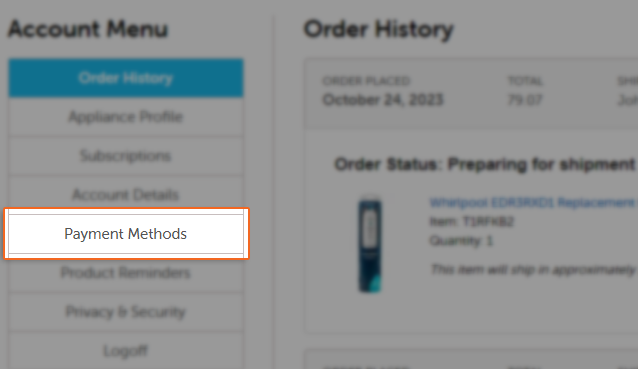
- Add a new payment method by clicking "Add Payment" and select the checkbox for "Default payment method" to associate the new payment method with your subscriptions. Enter your information into the corresponding fields. Please enter your name as it appears on your card, including any initials/prefixes.
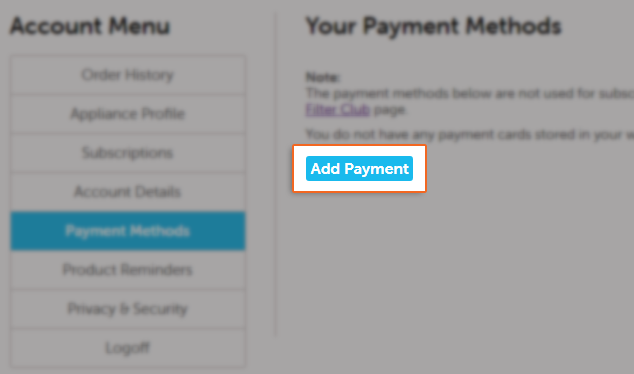

- Click "Save Card" to complete the update.
- You have now updated your subscription payment method, and future Home Filter Club orders will default to this payment method.
When you log into your account, click "Subscriptions" from the menu on the left side of the screen.
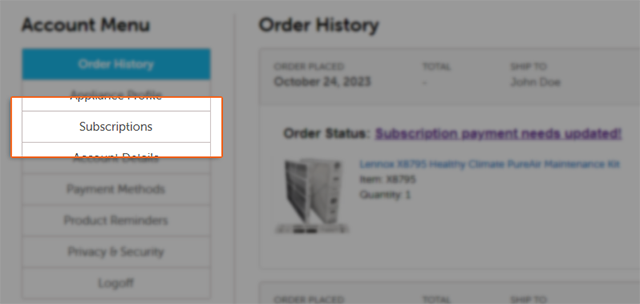
From the "Subscriptions" page, on the first tab titled "My Next Order" click "Edit Date".
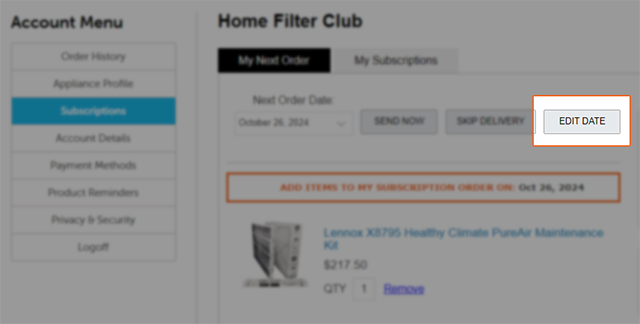
A mini calendar will pop up, and you may now select the date of your next order. Finalize the change by clicking "OK"

You should now see the new date as the date of your next order, indicating that the change was successful.
You may make changes to your subscription online.
Log in to your Filters Fast Account and follow these steps:
- Go to www.filtersfast.com and click "My Account" at the top of our web page.
- Under "Login to Your Account" enter your email address and password.
- Once you are logged in, click the link titled "Subscriptions".
- Click the button to add items to your subscription.
You will be redirected to our homepage once you click on "Start Shopping" and will be able to search for the item that you would like to add where you can the desired item right from the item page - this will be presented in orange text with an orange frame around it
You may cancel your Home Filter Club subscription at any time from the Subscriptions page of your account - just go to the second tab (labeled "My Subscriptions), click "Cancel Subscription" and choose a reason for cancellation. Your subscription is now cancelled, and you will receive an email confirming this.
Would you like to keep your subscription but change the schedule? Put your next subscription order on hold.
By joining the FiltersFast.com Home Filter Club you will:
- Enjoy the convenience of not having to reorder
- Cancel or modify your orders anytime
- Select delivery schedule that works for you
- Receive a discount of up to 10%* and free shipping** on all Home Filter Club subscription orders
- Pay as you go